Gasly Interactive Receipt
- My role
- Product Designer, Motion Designer, Interaction Designer
- Scope
- Designing and building an animated, fully data-driven receipt printer in Rive for the Gasly app.
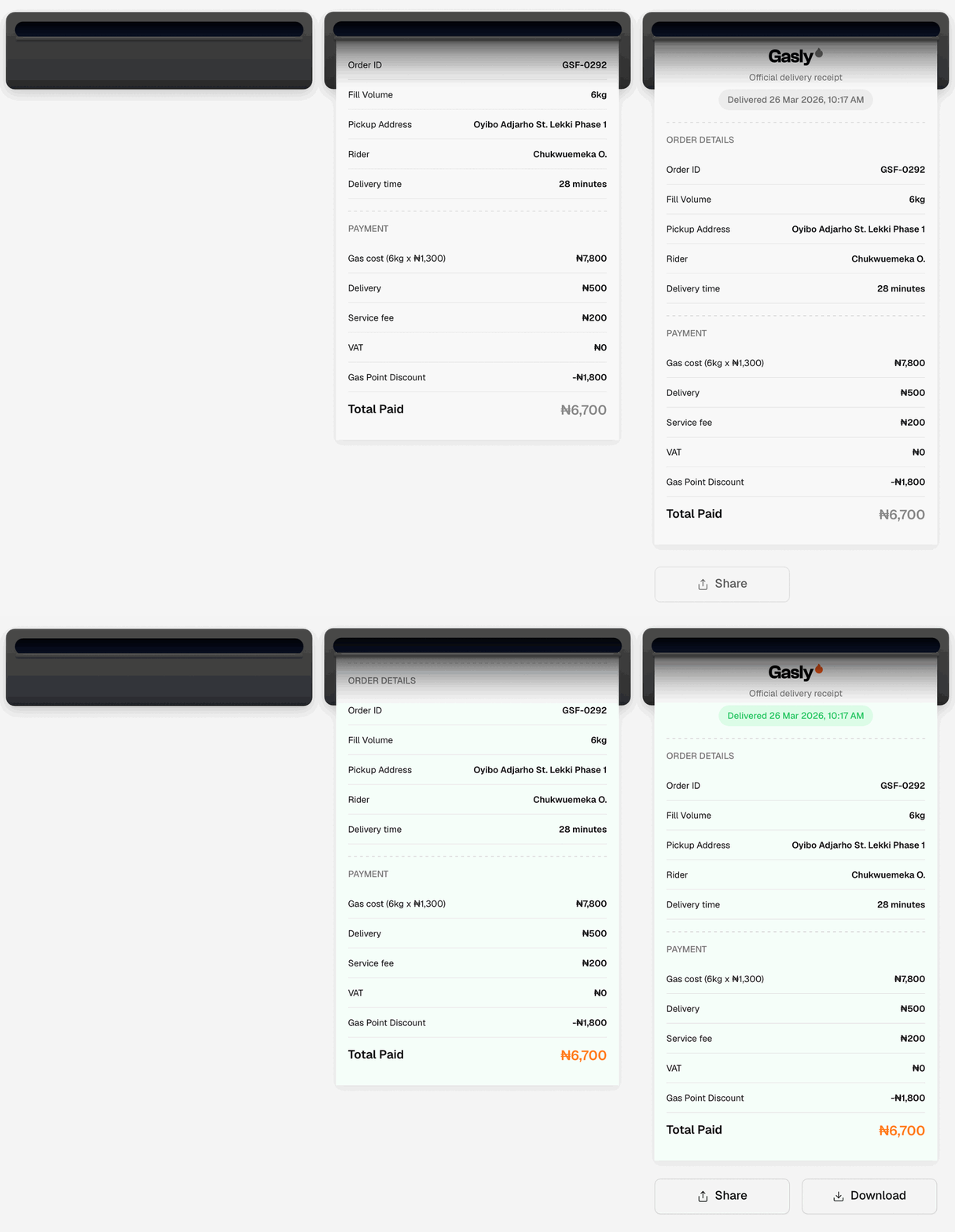
When a Gasly order is complete, the customer lands on a receipt screen. The receipt was a static design: three stacked cards for the Gasly header, the order details and the payment breakdown, followed by Share and Download buttons.
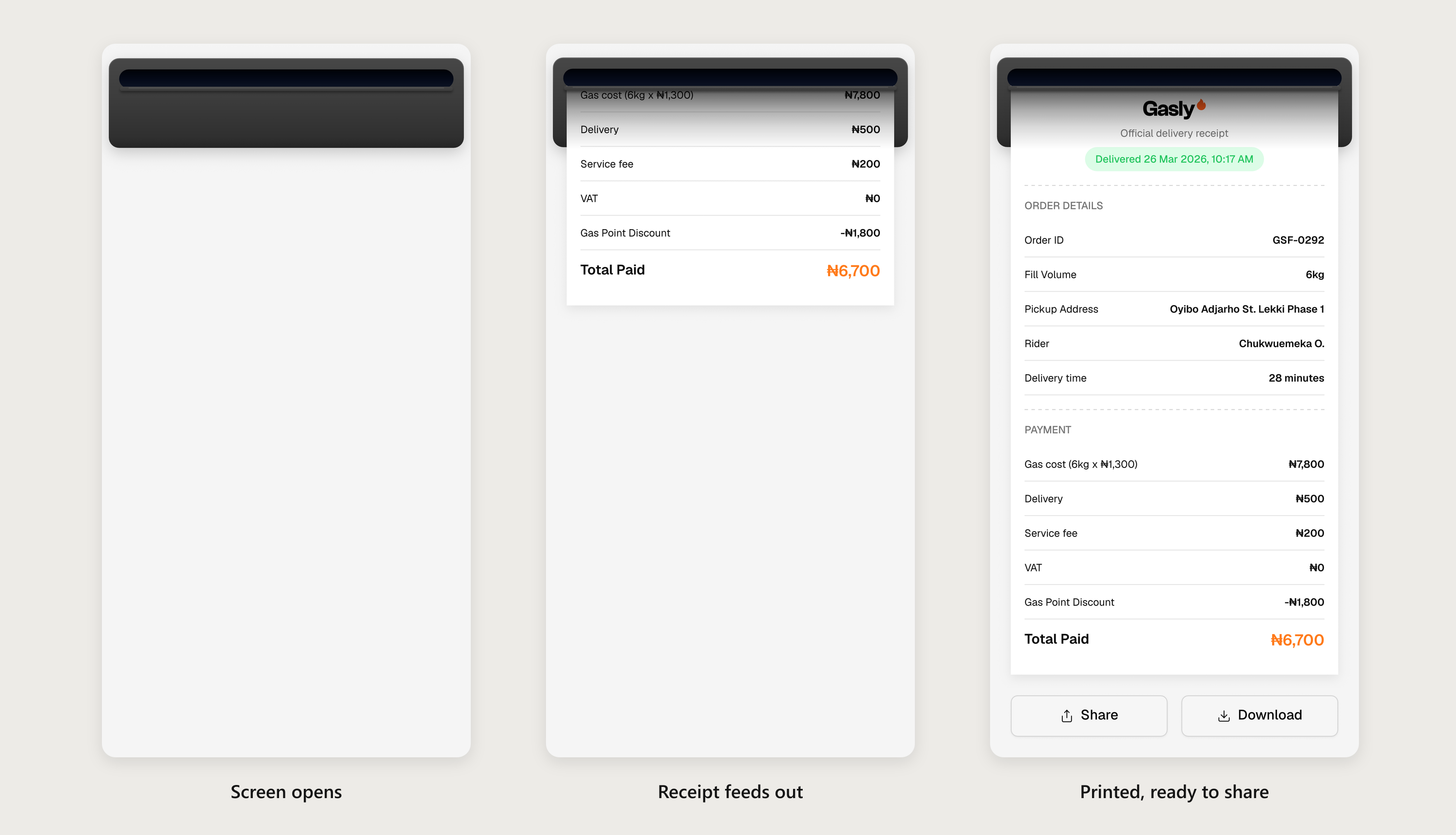
I turned that screen into a small moment of delight. A charcoal receipt printer sits at the top of the screen and, as the screen opens, the Gasly receipt feeds out of its slot as one long strip of paper. When printing finishes, the Share and Download buttons rise in underneath. Tap the printer and it pulls the paper back in and prints it again.
Under the animation, the receipt is not a picture. Every value on it comes from the app, any row can be switched off, and the paper, the animation and the screen height all adapt to whatever the app sends.
Before opening Rive I wrote down the decisions that would shape the whole build, so the design, the animation and the engineering handoff all pulled in the same direction:
- One strip, not three cards. The three receipt cards merge into a single paper strip with dashed dividers between the sections, like a real thermal receipt.
- A clear split between Rive and native. Rive owns the printer, the paper and the two buttons. The status bar and the "Receipt / Order #" header stay native React Native.
- Every value is live. Fourteen text values and ten row-visibility switches are bound to data. Hiding a row shortens the paper.
- It prints on its own. The receipt auto-prints when the screen opens, and tapping the printer reprints it.
- It has to fit any phone. From a 320 pt phone up to tablets, where it stays 428 pt wide and centred. When the receipt is taller than the screen, a native ScrollView wraps the Rive view, and Rive tells the app how tall it needs to be.
- It respects Reduce Motion. Users who turn on Reduce Motion get the finished receipt with a short fade, not a sliding animation.
I designed everything at 428 × 828, the width of the original receipt frame, using Rive Layouts so that the width follows the phone and the height follows the content.
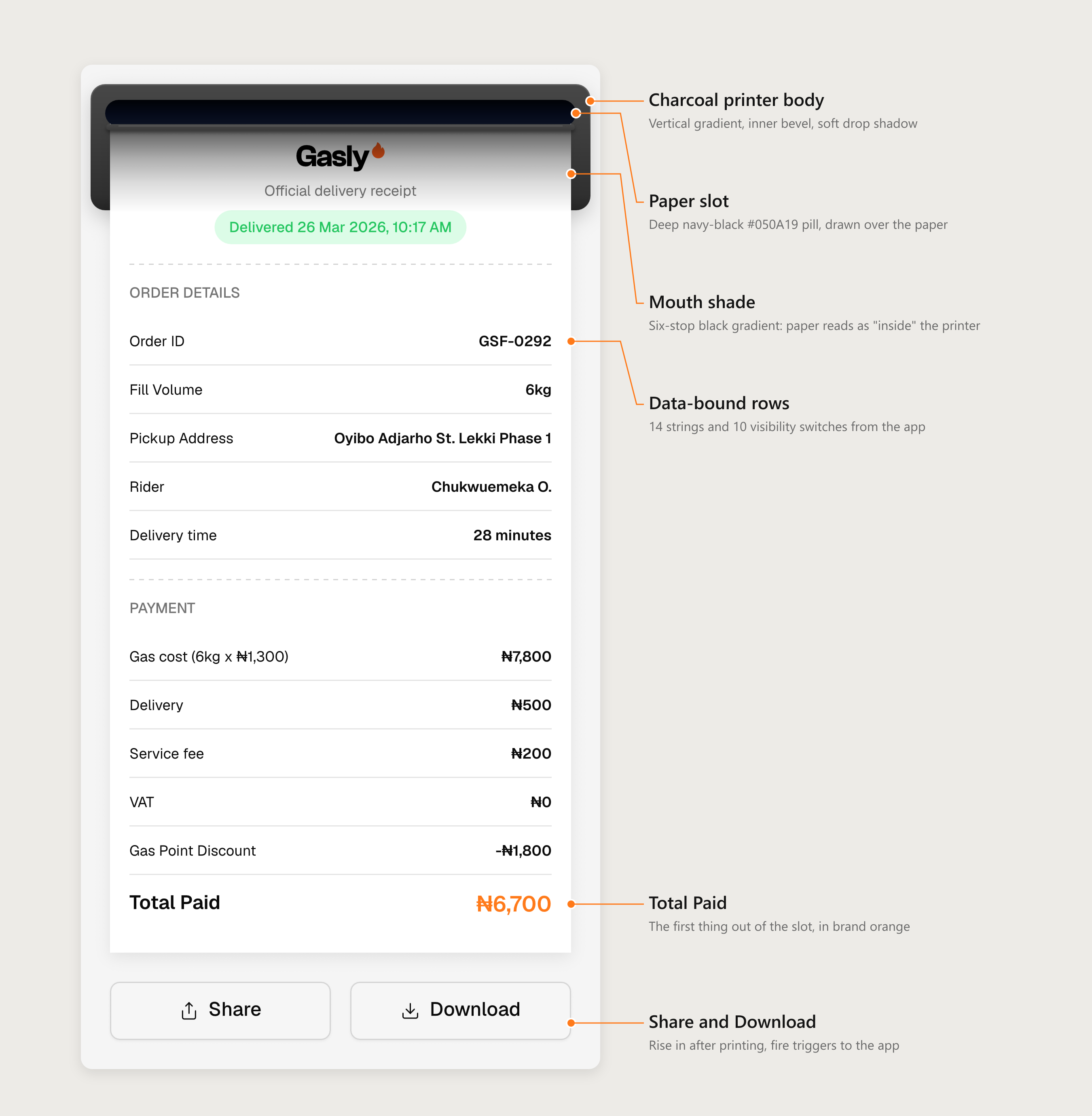
I kept the printer deliberately neutral so the receipt stays the hero. It matches a reference shot of a real receipt printer: a charcoal body with a deep navy-black slot, and no Gasly colour on it at all. The only orange on screen is the Total Paid amount.
- Body: a 412 × 104 rounded rectangle (radius 12) with a three-stop vertical gradient from #474747 to #2C2C2C, a 1 pt inner bevel that catches light along the top edge, and a soft 18% drop shadow.
- Slot: a 388 × 22 pill in #050A19, sampled from the reference and softened slightly, with a faint 10% white lip along its lower edge.
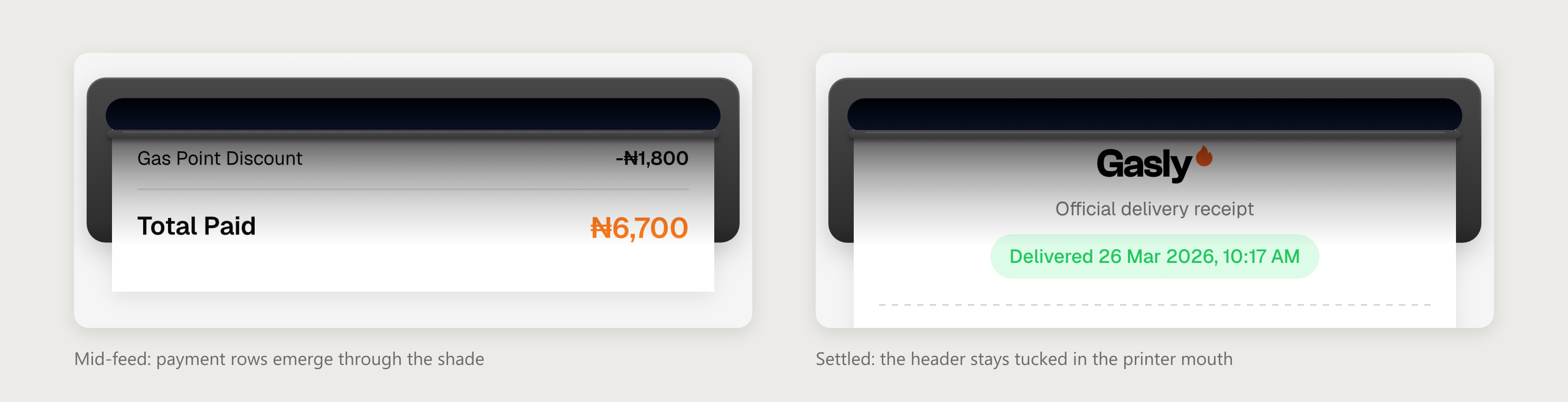
- Mouth shade: a six-stop black gradient (70% → 0% over 71 pt) laid over the paper just below the slot. I sampled it from the reference, where the paper goes from about 30% brightness under the slot to full white about 70 pt lower. This is what makes the paper read as coming out of a dark opening instead of sliding under a sticker.
At rest, the top of the receipt (logo and subtitle) stays tucked inside that shaded mouth, exactly as a real printed receipt hangs from the printer.
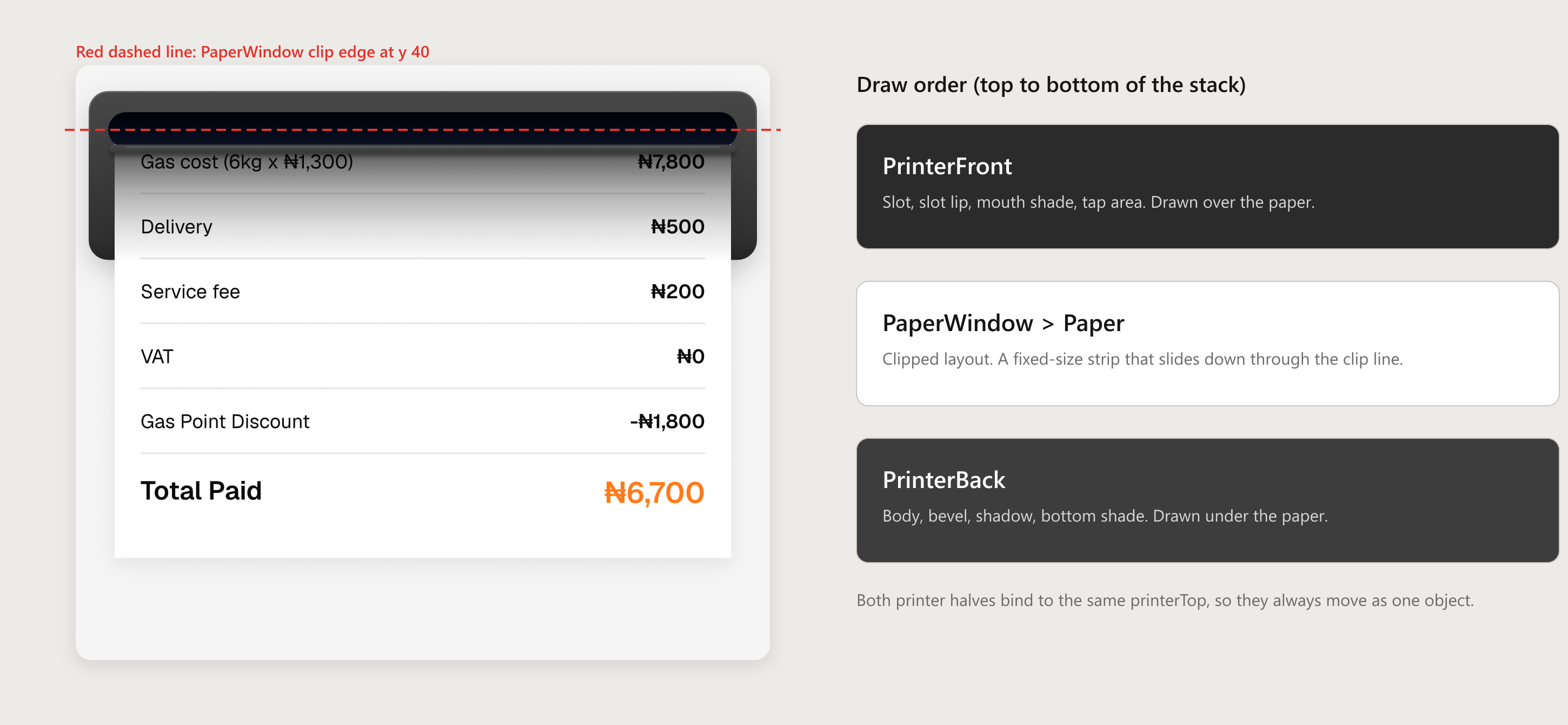
The obvious way to animate printing is to grow the paper or reveal it with a mask. Both look wrong: the content slides around inside the paper instead of travelling with it. So the receipt is never drawn line by line. It is one complete, fixed-size strip that starts parked above an invisible cut line at the centre of the slot, and the animation simply slides it straight down through that line.
Three pieces make that work:
- A clipped window. The paper lives inside a layout with clipping on, whose top edge is the cut line. Anything above it is invisible, so at the start the page is empty.
- Relative positioning. The paper moves with a relative offset, so the layout still measures its full height. The buttons below and the reported screen height never jump while the paper moves.
- A layer sandwich. I split the printer in two. The body is drawn under the paper, so the hanging receipt covers its lower face. The slot and the shade are drawn over the paper, so the moving cut edge is never visible. Both halves are bound to the same position, so they always move as one object.
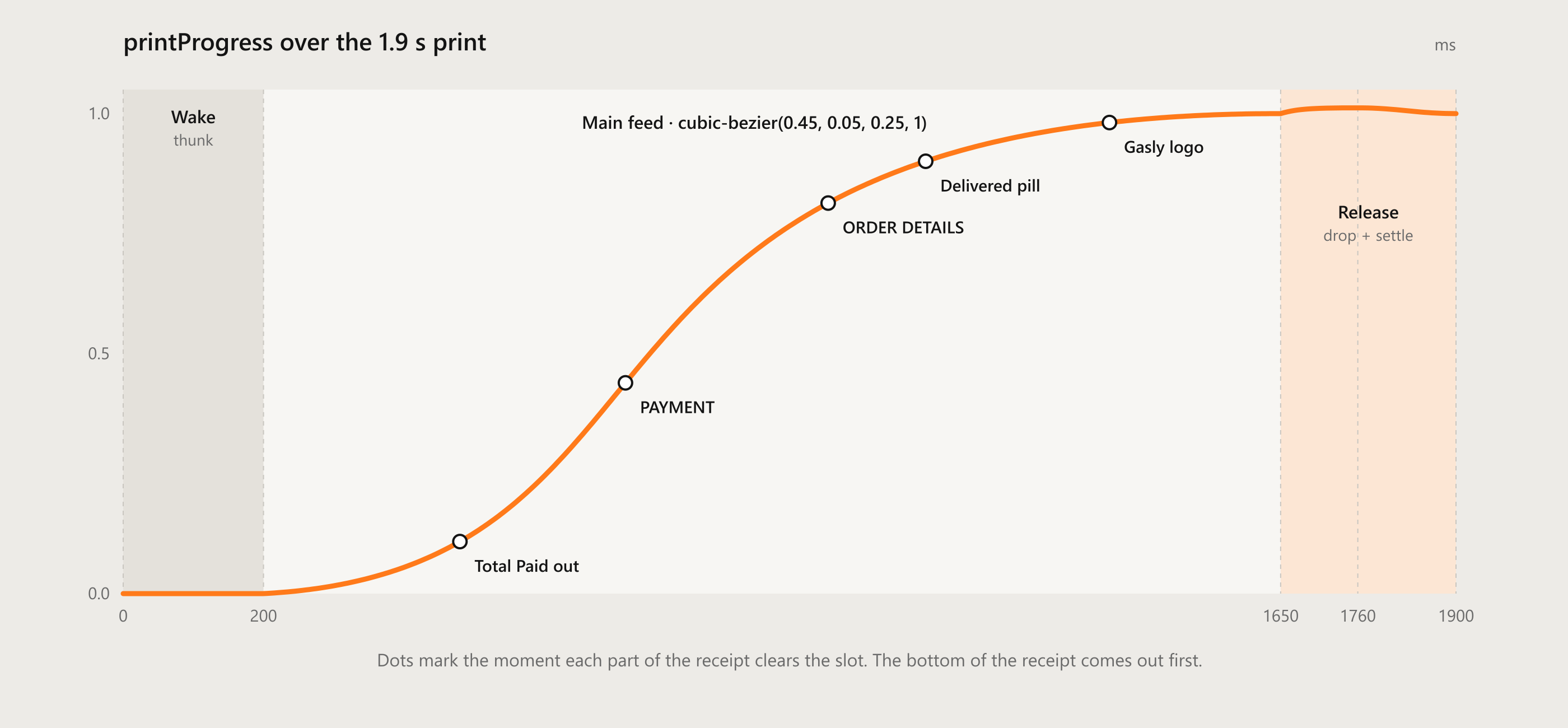
Because the paper moves down, the bottom of the receipt comes out first: Total Paid appears before anything else, and the Gasly header is the last thing to leave the printer.
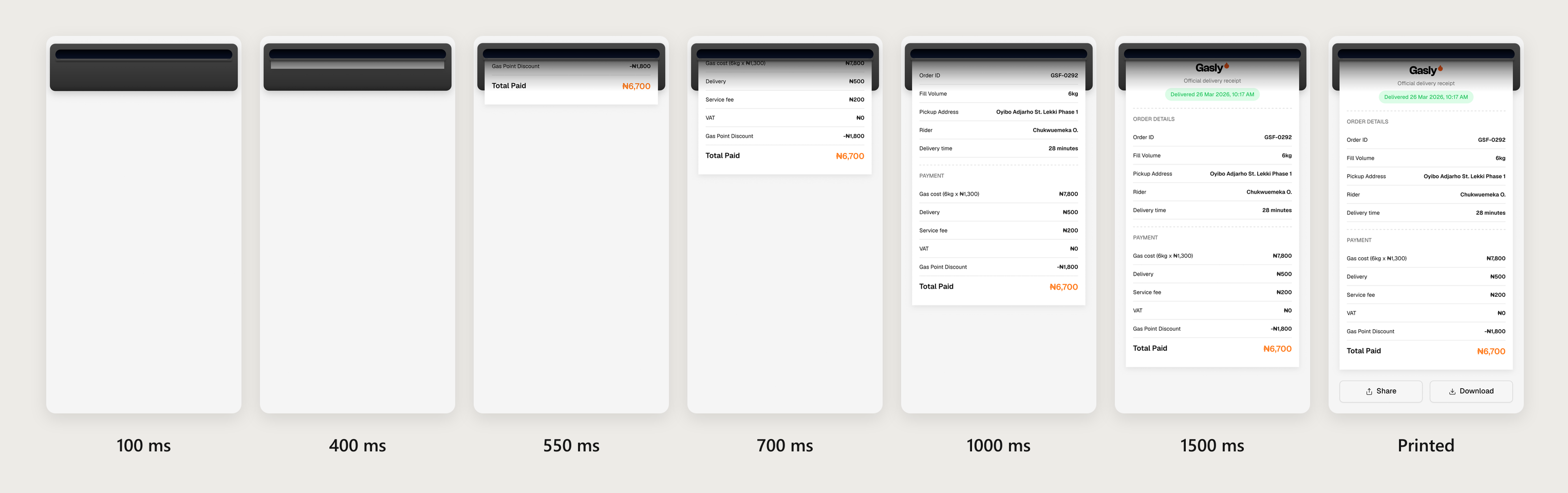
The print lasts 1.9 seconds, and I broke it into the beats of a real thermal printer:
- Wake (0–200 ms). The paper stays inside while the printer gives a small 1 pt "thunk" down and back, like a motor catching.
- Feed (200–1650 ms). The paper feeds out on cubic-bezier(0.45, 0.05, 0.25, 1): a slow start, fast through the middle and a gentle stop. During the feed the printer body buzzes ±0.5 pt at 22 Hz, too small to read as shaking but enough to feel mechanical.
- Release (1650–1900 ms). The paper drops a further 1.2% of its height, as if the printer let go of it, then settles back. The top edge stays hidden under the slot the whole time.
- Buttons (320 ms). Once printing ends, Share rises 12 pt and fades in, and Download follows 60 ms later. The stagger keeps them from arriving as one block.
- Retract (420 ms). On reprint, the paper is pulled back up on an accelerating ease, so it feels sucked in rather than reversed. Total Paid is the last thing to disappear, and printing starts again straight away.
I also added the sound of a receipt printer, synced to start with the feed at 200 ms and trimmed to the 1.45 s feed. The first version was too loud, so I brought it down by 10 dB. The app can mute it, and it never plays in Reduce Motion.
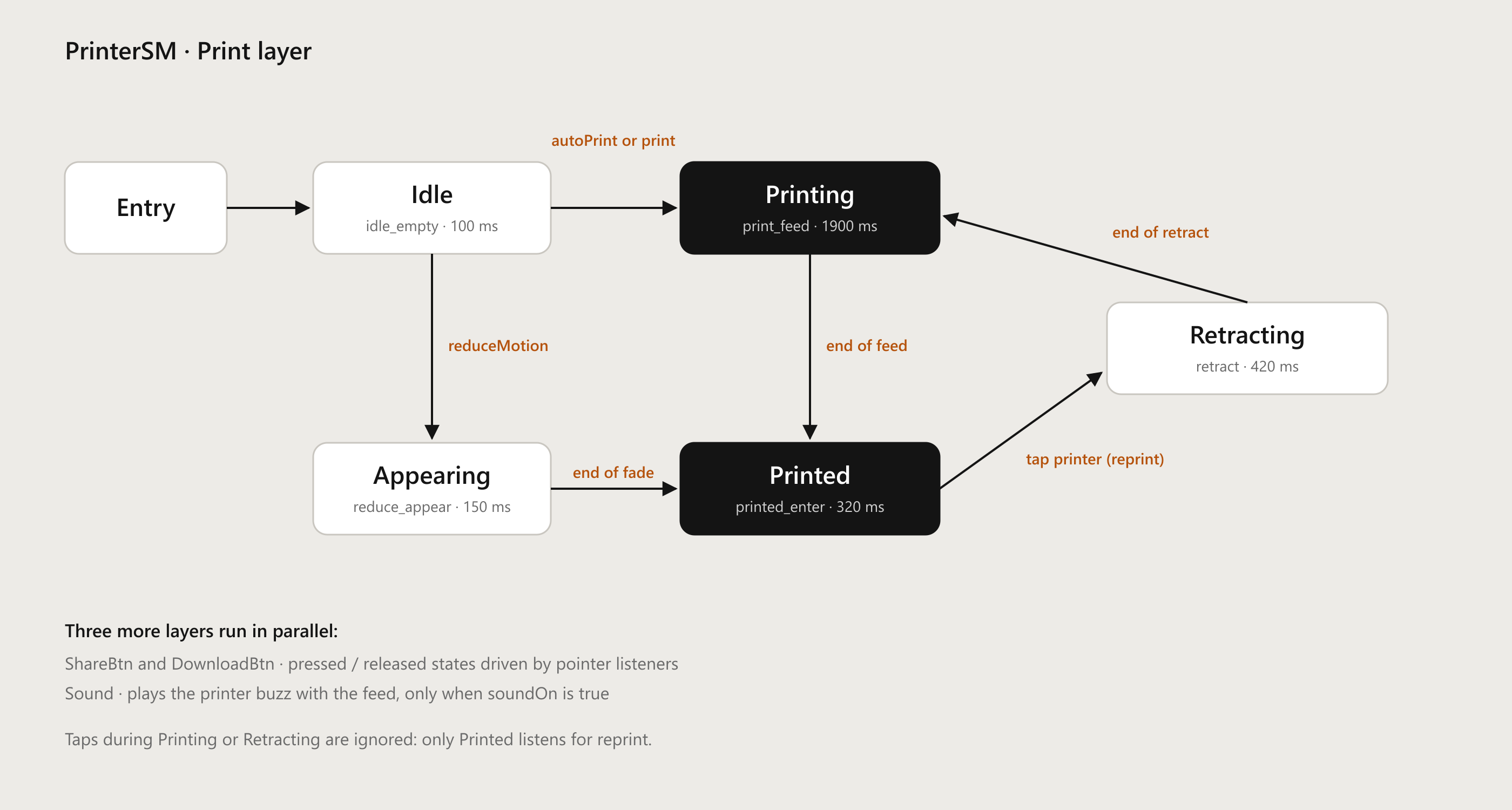
All of the behaviour lives in one Rive state machine, PrinterSM, with four layers running in parallel.
- Print: Idle → Printing → Printed, and Printed → Retracting → Printing for reprints. A separate Appearing state handles Reduce Motion.
- ShareBtn and DownloadBtn: pressed and released states for each button.
- Sound: plays the printer sound each time printing starts, when sound is on.
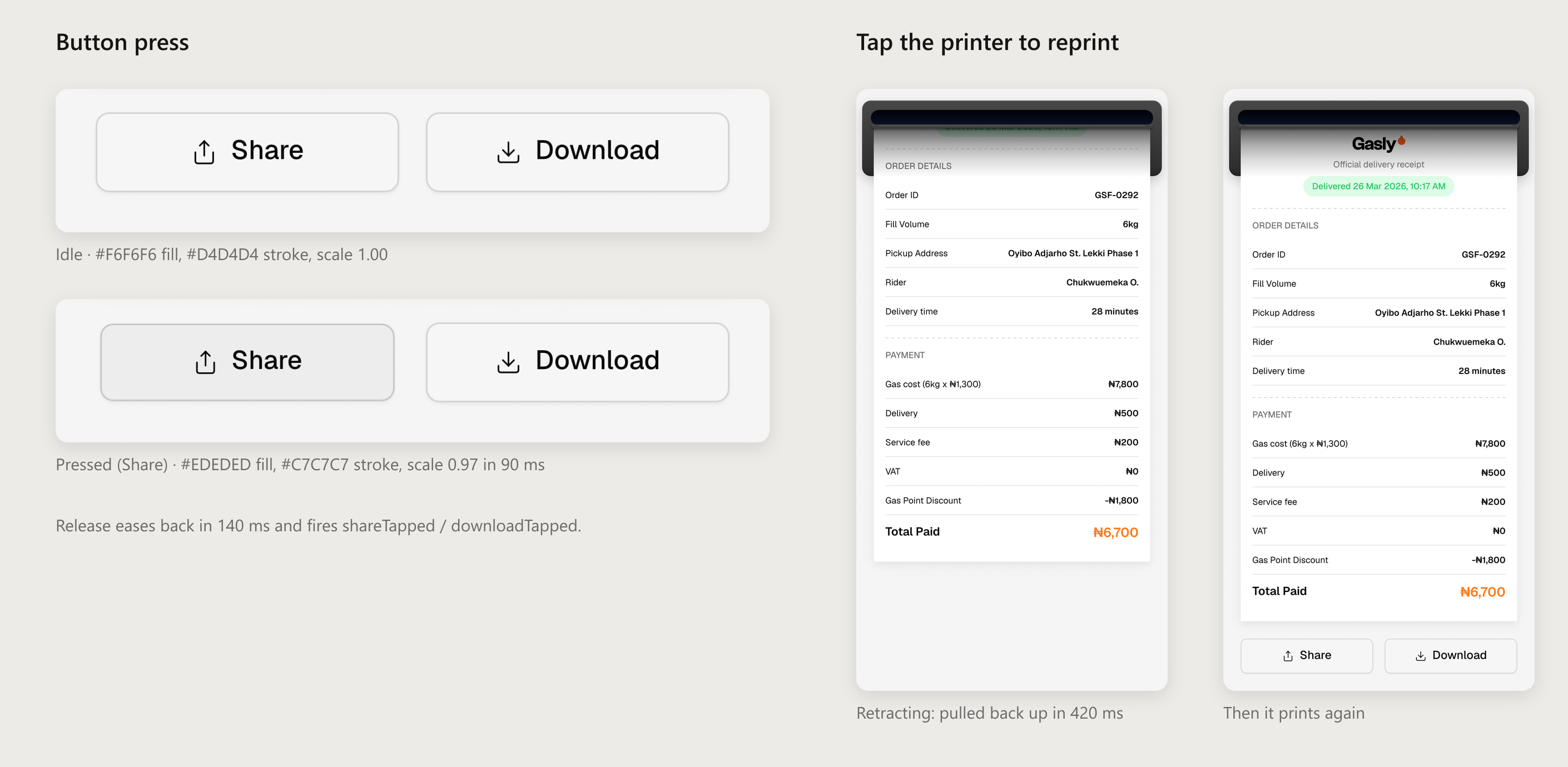
Nine pointer listeners drive it. Pressing a button darkens its fill and stroke and scales it to 0.97 in 90 ms; releasing eases it back in 140 ms and fires a trigger to the app. Pressing the printer dips it by 1 pt, and releasing it fires reprint.
Only the Printed state listens for reprint, so taps during printing or retracting are simply ignored and the animation can never be interrupted halfway. The press animations also start from whatever value is current, so a fast double tap never makes a button jump.
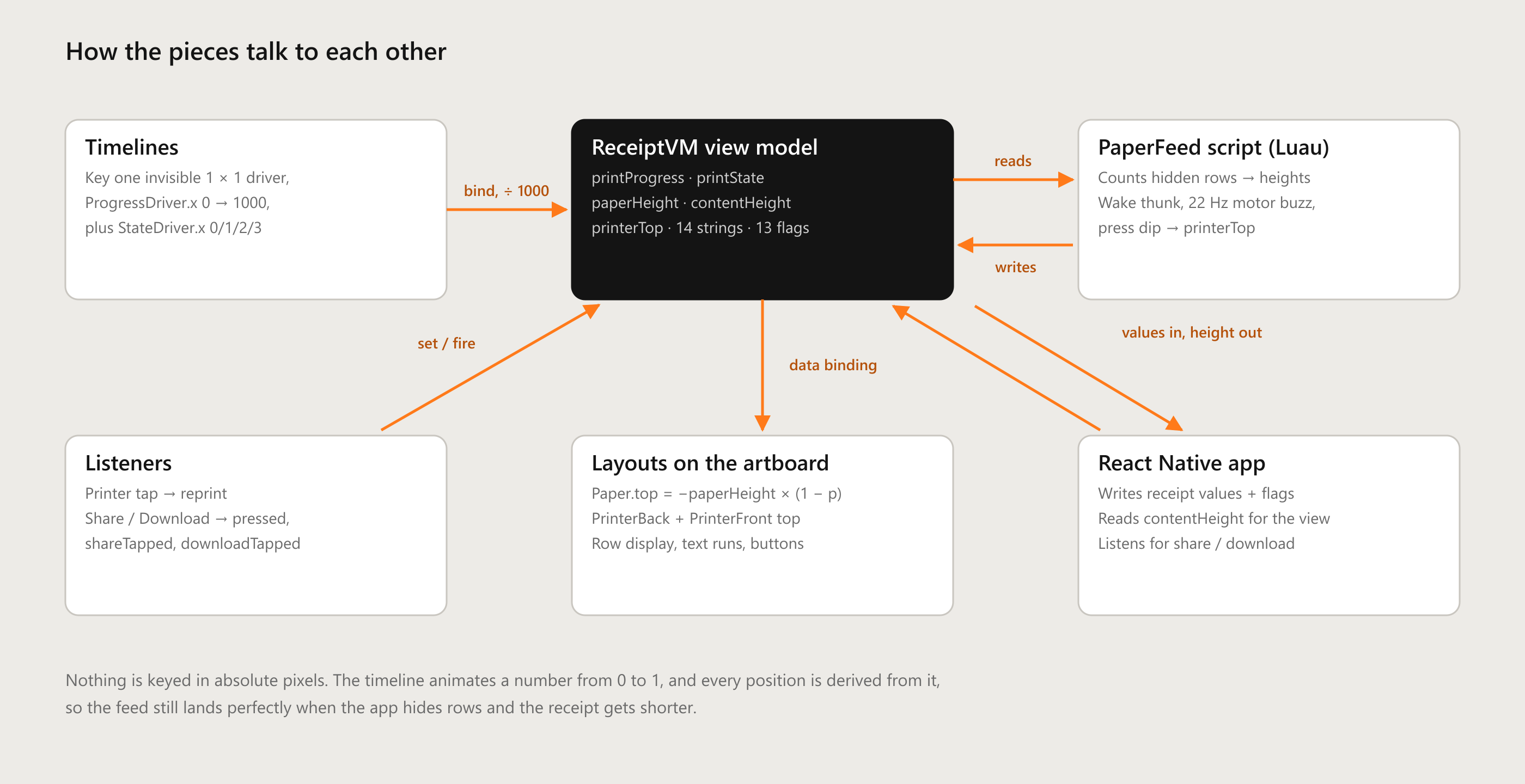
The receipt is driven by one view model, ReceiptVM, which is the contract between the Rive file and the app:
- In from the app: 14 text values (order ID, address, rider, fees, total and so on), 10 row switches, and behaviour flags for auto-print, Reduce Motion and sound.
- Triggers: print and reprint come in; shareTapped and downloadTapped go out to open the share sheet or save the receipt.
- Out to the app: the current print state, and contentHeight, which the app uses as the height of the Rive view inside its ScrollView.
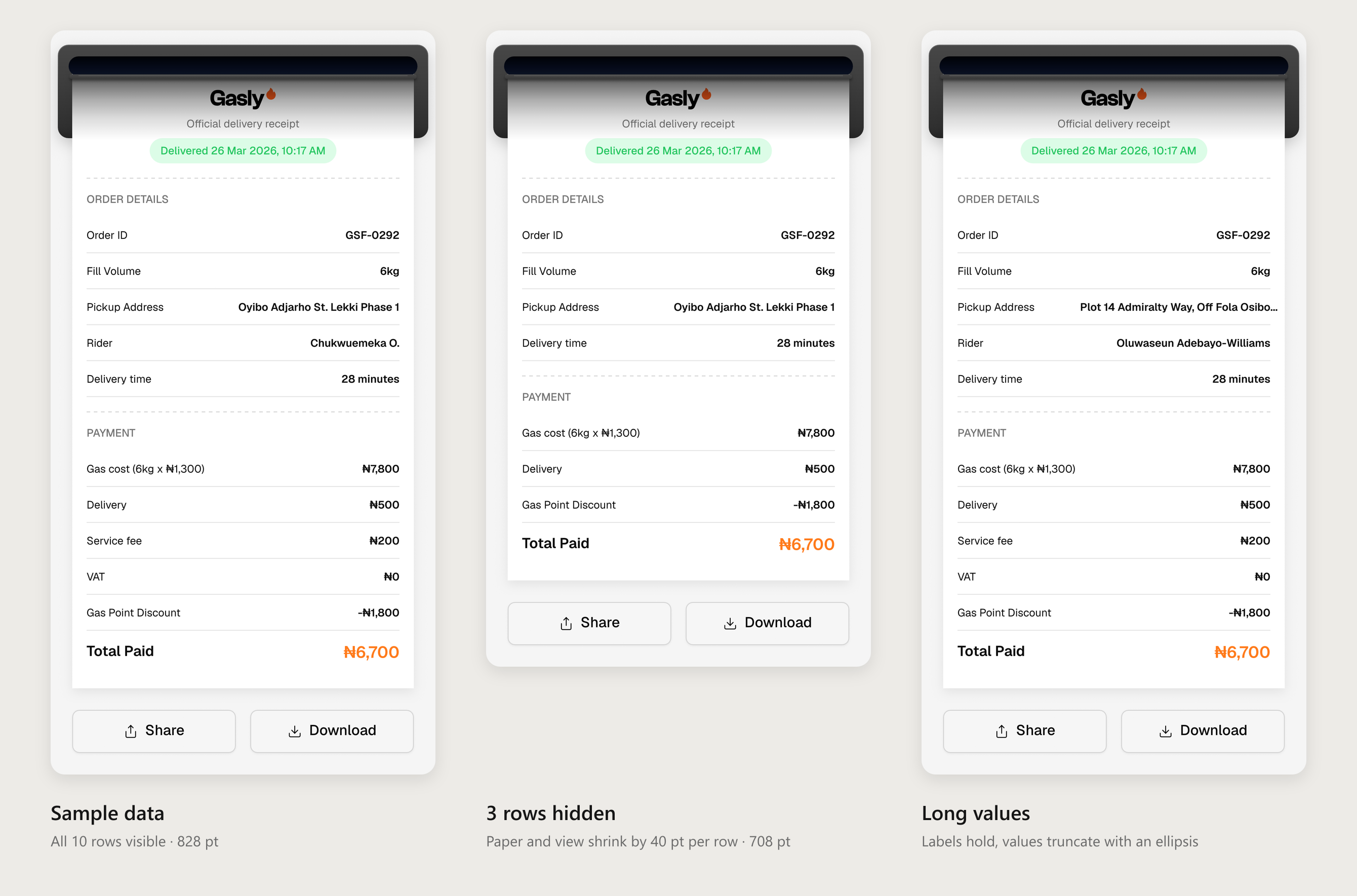
Every hidden row removes exactly 40 pt, from the paper and from the content height, so the app always knows how tall the receipt is. Because the feed is driven by a 0-to-1 progress value instead of fixed pixel keys, a shorter receipt still lands perfectly.
The Naira sign
One detail nearly broke the design. The receipt uses Geist, and Geist has no ₦ glyph: in Figma a fallback font had been quietly drawing it. Rive does not fall back, so a ₦ typed in Geist would render as an empty box. I made every ₦ its own text run set in Inter at the same size, weight and colour as the text around it, and the app sends plain numbers like "7,800". Rive adds the symbol, so the amounts read as "₦7,800" with no gap.
Long values and small screens
Labels never shrink; values are single-line, right-aligned and end in an ellipsis when they run out of room. Only horizontal insets stretch with the screen, so at 320 pt the row content is 240 pt wide, and every vertical measurement stays the same on every phone.
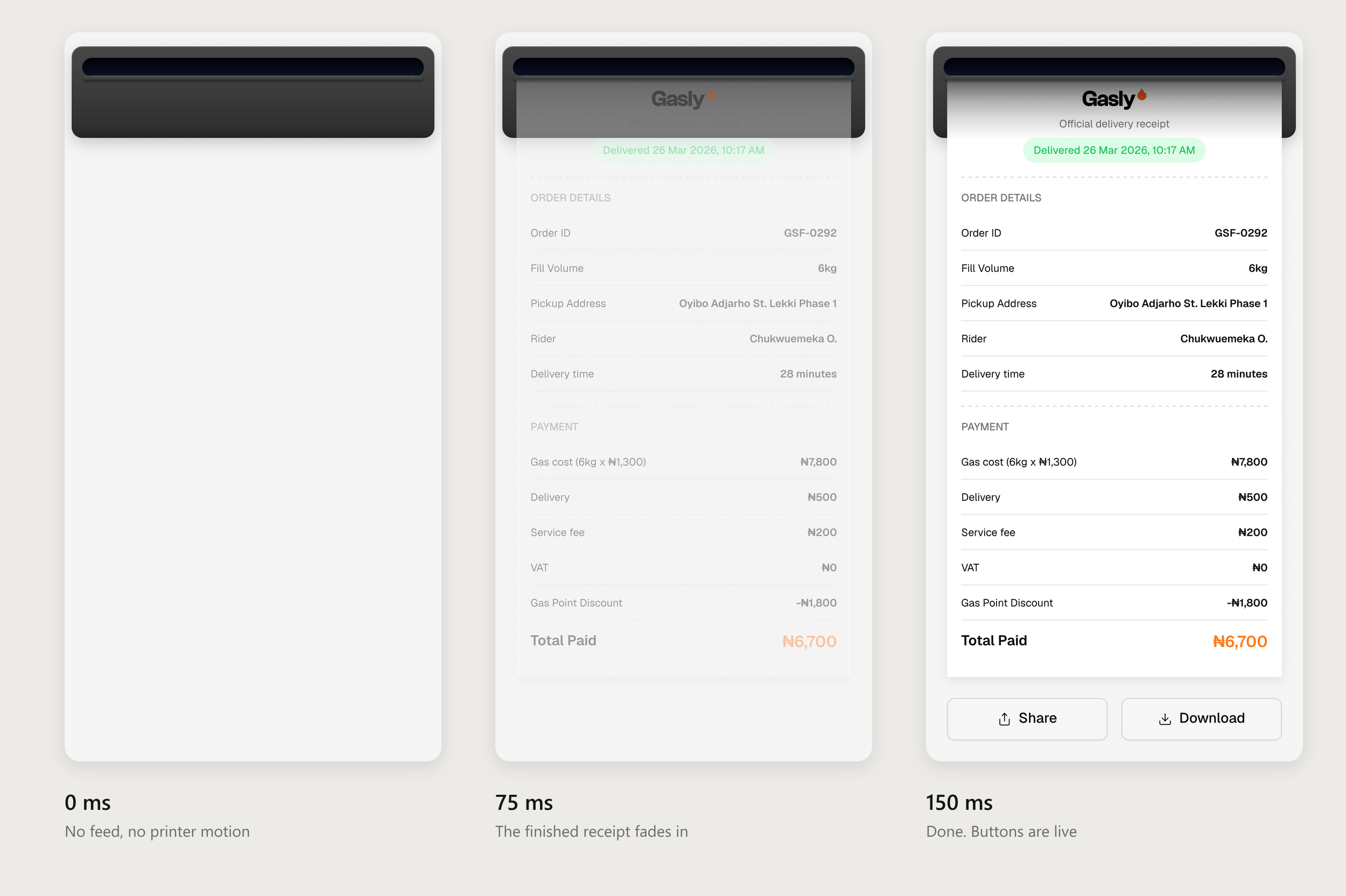
When the user has Reduce Motion turned on, the receipt does not slide or shake. It goes to a dedicated Appearing state: the paper is already fully out and simply fades in over 150 ms, then the buttons arrive as usual. There is no printer sound either.
My first plan was a 150 ms cross-fade straight into the Printed state. In testing, the blend mixed the two animations, so the paper visibly slid and the print state reported to the app went fractional for a moment. A purpose-built state fixed both: no movement at all, and the app gets a clean "printed" signal.
A few build decisions made the file robust enough to ship:
- One number drives everything. The timelines key a single invisible 1 × 1 shape, whose x position is bound to printProgress (divided by 1000). Animating x from 0 to 1000 writes 0 → 1 into the view model, and every position is derived from that number.
- A small Luau script for the physical details. PaperFeed counts the hidden rows, writes the paper and content heights, and computes the printer's wake thunk, motor buzz and press dip.
- Binding the paper directly. The script reads progress one frame late, which showed up as up to 20 pt of lag during the fastest part of the feed. I bound the paper position straight to printProgress through a formula converter instead, so it tracks the curve exactly.
- Keys on a 300 fps grid. At 60 fps some of my millisecond timings fell between frames. A 300 fps grid let every key land exactly on its time.
- A handoff the developers could follow. Fonts and audio are embedded, so the app needs no extra setup, and every view model name is fixed and documented. The developers read and write values by name with the Rive React Native runtime.
The printer shipped in the Gasly app as a single .riv file of about 1.7 MB, with fonts and sound included. It runs the whole receipt experience: printing, reprinting, share and download, live data, row hiding, responsive width and Reduce Motion, all from one artboard and one state machine.
- What I took away from it:
Fake the physics, not the pixels. The convincing part is not the paper. It is the slot drawn over it, the shade, the 1 pt thunk and the small drop at the end. - Design the data contract as carefully as the visuals. Agreeing on names, units and who formats what (the ₦ sign, the date) is what let the app team plug real receipts in without touching the animation.
- Animate a value, derive the layout. Driving the feed from a 0-to-1 progress value meant one animation works for every receipt length.